Just aced the AI-900: Microsoft Certified Azure AI Fundamentals exam!
Sunday, August 31, 2025
Friday, August 1, 2025
рокூрок்рокாродை vs роЪிроЩ்роХрок்рокாродை
рокொродுро╡ாроХ Software Engineering родுро▒ைропிро▓் Senior Tech Lead роЕро▓்ро▓родு Senior Consultant роОройுроо் рокродро╡ிропிрой் рокிрой்ройро░் Junior Solutions Architect роОройுроо் рокродро╡ி роЙропро░்ро╡ுроо் рокிрой்ройро░் Solutions Architect роОройுроо் рокродро╡ி роЙропро░்ро╡ுроо் роЕрооைропுроо்.
Thursday, July 31, 2025
Officially a Solutions Architect!
Back in June 2024, I applied for two internal openings in our organization — Junior Solutions Architect and Solutions Architect. After case studies, technical and non-technical interviews, the verdict was clear:
"You’re above Junior, but not quite there for Solutions Architect yet."I was offered two choices:
1. Step into the Junior Solutions Architect role.
2. Take the challenging path — continue as a Senior Digital Consultant, but also play the role as a Solutions Architect and prove myself by achieving key KPIs. What if I couldn't achieve the KPIs: Back to Senior Digital Consultant.
I chose the second: The challenging and risky path. It wasn’t easy. Balancing both roles meant long hours, tough decisions, and constant learning. But I’m incredibly grateful to say:
I made it — officially promoted to Solutions Architect!
And I didn’t do it alone. I had the best support around me. Thanks for everyone who supported from Gallagher.
To Abul Khalam Azad and Jon Roper from my team— thank you for giving me the space and trust to explore and grow.
To Malsha Jayamaha, our Director — I appreciate your leadership and continuous encouragement.
And a big shoutout to Maduranga Gunasekara— my partner in crime, always stepping in, backing me up, and pushing forward as a true team player.
Thanks to Harinath Krishnakumar for being my guide and compass throughout this architect journey
Thanks to Ash Shahata and Ying Zou for trusting me with the new initiatives especially the AI initiatives from the Architecture practice at Gallagher — an area I’m deeply passionate about.
I'm deeply grateful to Ramakrishnan Vedanarayanan, our AI guru, whose mentorship has been invaluable in continuously expanding my thinking and knowledge, especially in AI. He's an exceptional companion for intellectual exchange.
Let's not forget my pillars
Hibathul Careem sir – My mentor. A constant source of wisdom and clarity
Prabath Fonseka – my architect, who set the foundation
Madu Ratnayake – whose leadership early in my career shaped my mindset
Dinusha Kumarasiri – always there as a friend and motivator
Taking the harder path was never easy. But with a team like this behind me, it was possible. Here’s to the journey ahead! Will give my 100%.
Tuesday, July 18, 2023
Site Collection Quotas and Locks greyed out in Central Administration
Problem
One our site collections in SharePoint 2016 farm was in read only mode. When I navigate through Central administration the options under Site Collection Quotas and Locks are greyed out and I was not able to change the options.
Solution
To remove the read only I ran the below PowerShell script and it worked.
$site = Get-SPSite "siteurl"
$site.GetType().GetProperty("MaintenanceMode").GetSetMethod($true).Invoke($site, @($false))
Saturday, November 5, 2022
Type 'WebPartContext' is not assignable to type 'ISPFXContext' error in SPFX
The types of 'msGraphClientFactory.getClient' are incompatible between these types.
Type '(version: "3") => Promise<MSGraphClientV3>' is not assignable to type '() => Promise<any>'
Tuesday, November 1, 2022
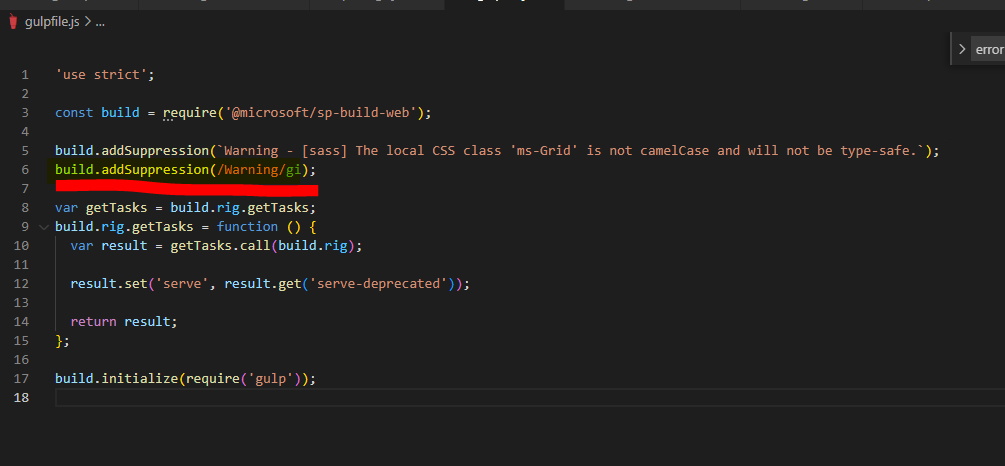
Warnings messages lead to fail the SharePoint Framework build process
Problem Background
Tuesday, September 20, 2022
Cannot read configuration file because it exceeds the maximum file size - SharePoint Central Admin not loading
Problem Background
I was patching SharePoint 2013 servers, after completing the patching and running the PS Config the central admin didn't load and it was giving the below error.
- Create a Key named Configuration under HKEY_LOCAL_MACHINE\ SOFTWARE\Microsoft\InetStp
- Create a DWORD and add the key as MaxWebConfigFileSizeInKB add the value as 300
- Save