Pages

Showing posts with label JSOM. Show all posts

Tuesday, January 17, 2017

How to disable client side people picker using JQuery in SharePoint 2013 | SharePoint Online

Problem

I had created SharePoint people picker using the example from msdn in my aspx page. I had to disable people picker through JQuery in order to full fill my client’s requirement.

Solution

According to above mentioned msdn post people picker is initiated on.

  <div id="peoplePickerDiv"></div>

So the id of the div is peoplePickerDiv. So with that I will show the solution.

Step 1:

Create an object of people picker.

  var peoplePicker = this.SPClientPeoplePicker.SPClientPeoplePickerDict.peoplePickerDiv_TopSpan;

Step 02:

Set Enable state to fasle.

peoplePicker.SetEnabledState(false);

This will disable the people picker. But you can remove the people objects with X sign. So in Step three we have to remove X.

Step 03:

Remove the X image.

$('#peoplePickerDiv_TopSpan_ResolvedList').find('.sp-peoplepicker-delImage').hide();

Conclusion

Now the people picker is disabled.

image


Tuesday, June 9, 2015

How to get SharePoint User by User Id in JavaScript using JSOM

Solution

  1. function getUserById() {
  2.  
  3.     var context = new SP.ClientContext.get_current();
  4.     var user = context.get_web().get_siteUsers().getById('1073741823');//Give the user id here
  5.     context.load(user);
  6.     context.executeQueryAsync(
  7.          Function.createDelegate(null, ensureUserSuccess),
  8.          Function.createDelegate(null, onFail)
  9.     );
  10.  
  11.     function ensureUserSuccess() {
  12.         //You can access the properties here
  13.         alert(user.get_title());
  14.         alert(user.get_loginName());
  15.     }
  16.  
  17.     function onFail() {
  18.         alert('Fail');
  19.     }
  20. }

Tuesday, April 7, 2015

Retrieve form urls in JSLink (NewForm.aspx | DispForm.aspx | EditForm.aspx) in SharePoint Online and in SharePoint 2013


Problem

I had a requirement to add a link tag where the url redirects to Display form of a item. I was rendering the view using JSLink.

Read my previous posts on JSLink on http://jsuhail.blogspot.com/search/label/JSLink

Solution

Display Form Url

var url = String.format('{0}&ID={1}', ctx.displayFormUrl, ctx.CurrentItem.ID);

Edit Form Url

  1. var url = String.format('{0}&ID={1}', ctx.editFormUrl, ctx.CurrentItem.ID);

New Form Url

ctx.newFormUrl

Tuesday, September 30, 2014

Client Side Rendering using JSLink – Post 03 – Properties to override

Introduction

Read my first two post in order to get basics idea on Client Side rendering using JSLink.

In last two post we discussed basics on JSLink. Now lets look bit deeper. In this post I will illustrate; what are the fields we can override and use in template. I will give you examples for each and every property. Below are the properties that we can use to override in our custom template.

  • Header
  • Footer
  • View
  • Body
  • Group
  • Item
  • Fields
  • OnPreRender
  • OnPostRender

I have created an announcement list instance in order to illustrate the examples. My list instance displays as follows. Please note that I have grouped the list items by Created.

image

I have linked my JavaScript file for the above list instance. Now lets get into the examples.

Header

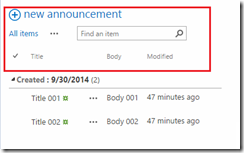
Overrides the Header of the list instance. The header area is described by the below image.
image

Code
  1. (function () {
  2.     // Initialize the variable that stores the objects.
  3.     var overrideCtx = {};
  4.     overrideCtx.Templates = {};
  5.  
  6.     // Change the header
  7.     overrideCtx.Templates.Header = "<b>This is a custom header</b>";
  8.  
  9.     // Register the template overrides.
  10.     SPClientTemplates.TemplateManager.RegisterTemplateOverrides(overrideCtx);
  11. })();

Results

image

Footer

We can add a footer in the list instance.

image

Code
  1. (function () {
  2.     // Initialize the variable that stores the objects.
  3.     var overrideCtx = {};
  4.     overrideCtx.Templates = {};
  5.  
  6.     // Change the footer
  7.     overrideCtx.Templates.Footer = "<b>This is a custom footer</b>";
  8.  
  9.     // Register the template overrides.
  10.     SPClientTemplates.TemplateManager.RegisterTemplateOverrides(overrideCtx);
  11. })();
Results

image

Fields

Visit my first blog post and see the example. You can understand how to override the fields. If you want to retrieve the actual value of a field you can retrieve by  “<#= ctx.CurrentItem.FieldName#>” or by ctx.CurrentItem.FieldName.

Code
  1. (function () {
  2.     // Initialize the variable that stores the objects.
  3.     var overrideCtx = {};
  4.     overrideCtx.Templates = {};
  5.  
  6.     overrideCtx.Templates.Fields = {
  7.         'Body': { 'View': '<div style="color:red; background-color: green"><#= ctx.CurrentItem.Body #></div>' }
  8.     };
  9.  
  10.     // Register the template overrides.
  11.     SPClientTemplates.TemplateManager.RegisterTemplateOverrides(overrideCtx);
  12. })();
Results

image

Group

Overriding Group takes 7 parameters. Using those parameters you can change the look and feel of the group. I will just show you a basic.

Code
  1. (function () {
  2.     // Initialize the variable that stores the objects.
  3.     var overrideCtx = {};
  4.     overrideCtx.Templates = {};
  5.  
  6.     overrideCtx.Templates.Group = customGroup;
  7.     // Register the template overrides.
  8.     SPClientTemplates.TemplateManager.RegisterTemplateOverrides(overrideCtx);
  9. })();
  10.  
  11. function customGroup(ctx, group, groupId, listItem, listSchema, level, expand) {
  12.     var html = '<div style="color:red">' + listItem[group] + ' </div>';
  13.     return html;
  14. }
Results

image

Body

Overrides the body.

Code
  1. (function () {
  2.     // Initialize the variable that stores the objects.
  3.     var overrideCtx = {};
  4.     overrideCtx.Templates = {};
  5.  
  6.     overrideCtx.Templates.Body = customBody;
  7.     // Register the template overrides.
  8.     SPClientTemplates.TemplateManager.RegisterTemplateOverrides(overrideCtx);
  9. })();
  10.  
  11. function customBody(ctx) {
  12.  
  13.     return String.format("Hello world from {0}", ctx.ListTitle);
  14.  
  15. }
Results

image 

Item

The Item template points to the function that displays each Item in the list.

Code

  1. (function () {
  2.     // Initialize the variable that stores the objects.
  3.     var overrideCtx = {};
  4.     overrideCtx.Templates = {};
  5.    
  6.     overrideCtx.Templates.Header = "<B><#=ctx.ListTitle#></B>" +
  7.         "<ul>";
  8.  
  9.     // This template is assigned to the CustomItem function.
  10.     overrideCtx.Templates.Item = customItem;
  11.     overrideCtx.Templates.Footer = "</ul>";
  12.  
  13.  
  14.  
  15.     // Register the template overrides.
  16.     SPClientTemplates.TemplateManager.RegisterTemplateOverrides(overrideCtx);
  17. })();
  18.  
  19. // This function builds the output for the item template.
  20. // It uses the context object to access announcement data.
  21. function customItem(ctx) {
  22.     // Build a listitem entry for every announcement in the list.
  23.     var ret = "<li>" + ctx.CurrentItem.Title + "</li>";
  24.     return ret;
  25. }

Results

image

OnPreRender

OnPreRender event fires before the DOM is loaded. In my example I will show how to set a custom list name.

Code
  1. (function () {
  2.     // Initialize the variable that stores the objects.
  3.     var overrideCtx = {};
  4.     overrideCtx.Templates = {};
  5.  
  6.     //Over ride the header
  7.     overrideCtx.Templates.Header = "<#=ctx.ListTitle#>";
  8.  
  9.     //Set the List title on pre render event
  10.     overrideCtx.OnPreRender = function a() {
  11.         ctx.ListTitle = "Title from PreRender";
  12.     };
  13.  
  14.     // Register the template overrides.
  15.     SPClientTemplates.TemplateManager.RegisterTemplateOverrides(overrideCtx);
  16. })();
Results

image 

OnPostRender

OnPostRender event fires after DOM is loaded. So you can change the values after DOM load. Here in our example I have changed the background color.

Code
  1. (function () {
  2.     // Initialize the variable that stores the objects.
  3.     var overrideCtx = {};
  4.     overrideCtx.Templates = {};
  5.     //OnPostRender call postRenderHandler function.
  6.     overrideCtx.OnPostRender = postRenderHandler;
  7.  
  8.     // Register the template overrides.
  9.     SPClientTemplates.TemplateManager.RegisterTemplateOverrides(overrideCtx);
  10. })();
  11. function postRenderHandler(ctx) {
  12.     var rows = ctx.ListData.Row;
  13.     for (var i = 0; i < rows.length; i++) {
  14.         var isApproved = rows[i]["Title"] == "Title 001";
  15.         if (isApproved) {
  16.             var rowElementId = GenerateIIDForListItem(ctx, rows[i]);
  17.             var tr = document.getElementById(rowElementId);
  18.             tr.style.backgroundColor = "#ada";
  19.         }
  20.     }
  21. }
Results

image `

Conclusion

So the basics are covered and if you are familiar with JavaScript and CSOM you can do more on Client side rendering with JSLink.  In future posts I will show some examples how you can use client side rendering.

Thursday, June 5, 2014

Add, Update and Delete SPListItem in SPList using JavaScript Object Model

Introduction

One person commented that - he needs to know How to Add, Update and Delete SPListItem in a SPList using JavaScript Object Model in a previous blog post. So I thought of writing a post for him; and which may useful for other new SharePoint newbies too.

Solution

Add

  1. function Add() {
  2.     var clientContext = new SP.ClientContext();
  3.     var oWeb = clientContext.get_web();
  4.     var oList = oWeb.get_lists().getByTitle('List1');//Get SPList by Title
  5.     var itemCreateInfo = new SP.ListItemCreationInformation();
  6.  
  7.     var oListItem = oList.addItem(itemCreateInfo);
  8.     oListItem.set_item('Title', 'Value'); //Title is the field and Value is the value for field
  9.     oListItem.update();
  10.  
  11.     clientContext.load(oListItem);
  12.     clientContext.executeQueryAsync(Function.createDelegate(this, onQuerySucceeded), Function.createDelegate(this, onQueryFailed));
  13.  
  14.     //Function when the execution of the query successed
  15.     function onQuerySucceeded(sender, args) {
  16.         alert('Data ADDED successfully');
  17.     };
  18.     //Function to run when the execution falis
  19.     function onQueryFailed(sender, args) {
  20.         alert('Cannot ADD');
  21.     };
  22.  
  23. };

Update

  1. function Update() {
  2.     var clientContext = new SP.ClientContext();
  3.     var oWeb = clientContext.get_web();
  4.     var oList = oWeb.get_lists().getByTitle('List1');//Get SPList by Title
  5.  
  6.     var oListItem = oList.getItemById(1);//Get the list item by id
  7.     oListItem.set_item('Title', 'New Value');
  8.     oListItem.update();
  9.     clientContext.executeQueryAsync(Function.createDelegate(this, onQuerySucceeded), Function.createDelegate(this, onQueryFailed));
  10.  
  11.     //Function when the execution of the query successed
  12.     function onQuerySucceeded(sender, args) {
  13.         alert('Data UPDATED successfully');
  14.     };
  15.     //Function to run when the execution falis
  16.     function onQueryFailed(sender, args) {
  17.         alert('Cannot UPDATE');
  18.     };
  19. };

Delete

  1. function Delete() {
  2.     var clientContext = new SP.ClientContext();
  3.     var oWeb = clientContext.get_web();
  4.     var oList = oWeb.get_lists().getByTitle('List1');//Get SPList by Title
  5.  
  6.     var oListItem = oList.getItemById(1);//Get the list item by id
  7.    oListItem.deleteObject();
  8.     clientContext.executeQueryAsync(Function.createDelegate(this, onQuerySucceeded), Function.createDelegate(this, onQueryFailed));
  9.  
  10.     //Function when the execution of the query successed
  11.     function onQuerySucceeded(sender, args) {
  12.         alert('Data DELETED successfully');
  13.     };
  14.     //Function to run when the execution falis
  15.     function onQueryFailed(sender, args) {
  16.         alert('Cannot DELETE');
  17.     };
  18. };

You can download the entire solution from the below url. https://drive.google.com/file/d/0ByEnOE8DAdvhSWFfM0Jja1FHMms/edit?usp=sharing

Friday, May 30, 2014

Get SPList items (by CAML query) using JavaScript in SharePoint Apps

Introduction

Today I will show how to get SPList Items by filtering using CAML query. Also this post includes how to get the data from a custom field.

Solution Background

I use JQuery.Deferred and Promise in order to achieve the success and failure of the asynchronous call. There are plenty of articles on the internet regarding JQuery.Deferred. Please see the Reference section for more on this.

Solution

  1.   function query() {
  2.  
  3.             var camlQuery =
  4.                 "<Where>" +
  5.                 "<Neq>" +
  6.                 "<FieldRef Name='CustomFieldOne' />" +
  7.                 "<Value Type='Text'>Suhail Jamaldeen</Value>" +
  8.                 "</Neq>" +
  9.                 "</Where>";
  10.  
  11.             //Calling the method getListItemsByCAMLAsync.
  12.             //Here the fail and done methods are from the deffered object which is returning.
  13.             getListItemsByCAMLAsync('NameOfList', camlQuery, 'Include(DisplayName, Id, CustomFieldOne)')
  14.                     .fail(function (e) {
  15.                         alert((handeler.parseSPException(e)));
  16.                     }).done(function (items) {
  17.                         var enu = items.getEnumerator();
  18.                         while (enu.moveNext()) {
  19.                             var cu = enu.get_current();
  20.                             var id = cu.get_id();//Read the Id
  21.                             alert(id);
  22.                             var prope = cu.get_fieldValues();//You can see the fields which you are retreiving
  23.                             var initiator = cu.get_fieldValues().CustomFieldOne;//Readvalue from custom property (Single line)
  24.                             alert(initiator);
  25.                         }
  26.                     });
  27.  
  28.         };
  29.  
  30.         //This returns a deferred object.
  31.         function getListItemsByCAMLAsync(listName, query, fieldsFilter) {
  32.             var def = $.Deferred();
  33.             var clientContext = new SP.ClientContext();
  34.             var oWeb = clientContext.get_web();
  35.             var ol = oWeb.get_lists().getByTitle(listName);
  36.             var qry = new SP.CamlQuery();
  37.             qry.set_viewXml(query);
  38.             var items = ol.getItems(qry);
  39.  
  40.             clientContext.load(items, fieldsFilter);
  41.             clientContext.executeQueryAsync(function () {
  42.                 def.resolve(items);
  43.             },
  44.                 function (a, b) {
  45.                     def.reject(b);
  46.                 });
  47.             return def.promise();
  48.         };

Reference

http://sharepoint.stackexchange.com/questions/69878/how-to-use-client-object-model-javascript-to-get-a-custom-user-profile-propert

http://api.jquery.com/category/deferred-object/

http://www.htmlgoodies.com/beyond/javascript/making-promises-with-jquery-deferred.html

Conclusion

Should say Melick (http://melick-rajee.blogspot.com) for the guide on SharePoint Apps.

Wednesday, May 21, 2014

Get SharePoint list properties using JavaScript Object Model

Introduction

I was developing a SharePoint App using SharePoint JavaScript Object Model which also called SharePoint ECMAScript Client Object Model. Today I will show how to retrieve basic properties from SharePoint list.

Solution

  1. function getSPListProperties() {
  2.  
  3.           //Get the current context. Same as SPContext in server side
  4.           var ctx = SP.ClientContext.get_current();
  5.  
  6.           //Get the web
  7.           var web = ctx.get_web();
  8.  
  9.           //Get the list by its title
  10.           var list = web.get_lists().getByTitle('Title of the List Instance');
  11.  
  12.           //Load the properties which we need
  13.           ctx.load(list, 'Title', 'Id', 'Created', 'ItemCount');
  14.  
  15.           //Excecute the loded queries asyncronisly
  16.           ctx.executeQueryAsync(Function.createDelegate(this, onQuerySucceeded), Function.createDelegate(this, onQueryFailed));
  17.  
  18.           //Success method
  19.           function onQuerySucceeded() {
  20.               alert(list.get_title());
  21.               alert(list.get_id());
  22.               alert(list.get_created());
  23.               alert(list.get_itemCount());
  24.           }
  25.  
  26.           //Falied method
  27.           function onQueryFailed() {
  28.               alert('failed');
  29.           }
  30.       }


Conclusion

Please note that when you get the list through the method web.get_lists().getByTitle('Title of the List Instance'); It doesn’t load all the properties like in server side. We have to explicitly load the properties which we need.
When you didn’t load for a property, and try to call the method in order to get the data it will throw an exception.
Capture
Reference:
http://msdn.microsoft.com/en-us/library/office/jj245759(v=office.15).aspx#constructors

Saturday, April 19, 2014

How to prevent from declaring global variables in JavaScript?

Introduction

When we declare a variable in JavaScript; if its declared with the var keyword it will be a local variable and if we omit the var key work it will be implicitly declared as the global variable. Developers are always careful on creating global variables.

Problem Background

Developers may accidentally declare global variable without their knowledge.

Solution

  1.  
  2. function funcationName() {
  3.      "use strict";
  4. };


To avoid developers from creating global variable you can use strict mode as given below. .

 
Conclusion

If we use strict method; when we debug we will get an exception on the line where we have declared global variables. See the screenshot below.