Pages

Showing posts with label Patterns and Practices. Show all posts

Thursday, February 23, 2017

Communicate with Host Web from App Web through PnP JavaScript Core Library

Introduction

Yesterday I had blogged on “How to use PnP JavaScript Core Library with SharePoint Hosted Add-in”, as a continue for the above post; today we will discuss on “How to communicate with Host Web from App Web through PnP JavaScript Core Library”.

Solution

As a example for this blogpost we will list down all the lists which are available in Host web.

Download the sample from my previous post and replace the below code in App.js file.


'use strict';

//Get the QueryString data from the url
function getUrlParamByName(name) {
    name = name.replace(/[\[]/, "\\[").replace(/[\]]/, "\\]");
    var regex = new RegExp("[\\?&]" + name + "=([^&#]*)");
    var results = regex.exec(location.search);
    return results === null ? "" : decodeURIComponent(results[1].replace(/\+/g, " "));
}

function myPnP() {
    var addinWeb = getUrlParamByName("SPAppWebUrl");
    var hostWeb = getUrlParamByName("SPHostUrl");

    //This will read Lists from the host web
    $pnp.sp.crossDomainWeb(addinWeb, hostWeb).expand("Lists").get().then(function (result) {
        var resulttring = "";
        for (var i = 0; i < result.Lists.length; i++) {
            resulttring += "List Name: " + result.Lists[i].Title + "
List ID:" + result.Lists[i].Id + "
List Description:" + result.Lists[i].Description + "

"; } document.getElementById("message").innerHTML = resulttring; }).catch(function (err) { alert(err); }); } //Call the above function after the page load document.addEventListener('DOMContentLoaded', function () { myPnP(); });

Conclusion

When you run the project by hitting F5, the list name, list id and the list description will be displayed as below.

image

You can expect more blogposts since myself and my team is working on a large SharePoint hosted Add-in using PnP JavaScript Core Library.

You may download this sample from the below url.

https://drive.google.com/file/d/0ByEnOE8DAdvhZ3pveFRtSWFzUEk/view?usp=sharing

Wednesday, February 22, 2017

Use sp-pnp-js with SharePoint hosted Add-in

Introduction

My team is assigned to deliver couple of SharePoint hosted add-ins using Patterns and Practices JavaScript core library.

This blog post will be the starting and hopefully some more will follow.

PnP JavaScript Core Library

The Patterns and Practices JavaScript Core Library is a JavaScript Library which was created to help developers by simplifying common operations within SharePoint and the SharePoint Framework.

This library provides a fluent API to make building your REST queries intuitive and supports batching and caching. You can learn more on the project's homepage which has links to documentation, samples, and other resources to help you get started.

(http://dev.office.com)

Create a solution with SharePoint Hosted Add-in template in Visual Studio

image

Remove unwanted files and references

Remove sp.js

The sp.js is the library used for JavaScript Object model. This file contains the extension methods to communicate with SharePoint. Since we are going to communicate with SharePoint using pnp.js we will remove it from the Page.

Go to Default.aspx page and just delete the line which is shown below.

image

Add needed JavaScript Libraries

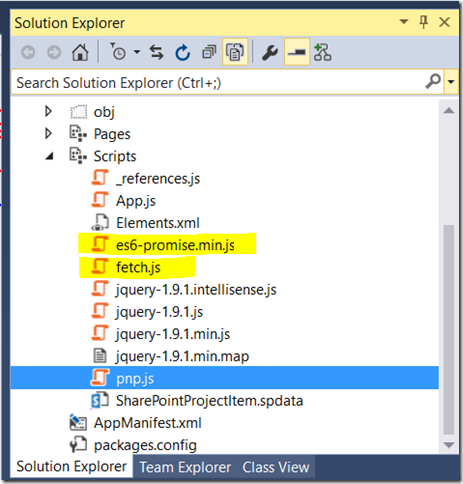
You have to add the below JavaScript libraries into Scripts Module.

image 

es6-promise.js  and fetch.js libraries are needed in order to the add-in work in Internet Explorer. It is because, PnP core library implements fetch and promises, which are not supported on Internet Explorer Browser. To overcome this issue, we need to add these libraries.

The libraries should be referred in the page as in the above order.

image

<script type="text/javascript"  src="../Scripts/es6-promise.min.js"></script>
     <script type="text/javascript" src="../Scripts/fetch.js"></script>
     <script type="text/javascript" src="../Scripts/pnp.js"></script>
     <script type="text/javascript" src="../Scripts/App.js"></script>

Now you are ready to query SharePoint environment using PnP Library.

Remove all the code from App.js file and the below sample code which will display the App Web Title and the url.


'use strict';

function myPnP() {
    //Retrieve Web Title and other details the current web
   

    $pnp.sp.web.select("Title", "Url", "Description").get().then(function (data) {
        var details = "";
        
        details += "Web Title : " + data.Title;
        details += "
Web URL : " + data.Url; details += "
Description : " + data.Description; document.getElementById("message").innerHTML = details; }).catch(function (err) { alert(err); }); } //Call the PnP method after the page load document.addEventListener('DOMContentLoaded', function () { myPnP(); });

Hit F5 and your solution will be deployed.

Conclusion

You can start working on SharePoint hosted add-in using PnP JavaScript Core Library.

Please download the solution from the link below.

https://drive.google.com/open?id=0ByEnOE8DAdvhbDRGcWdGS2hsQk0