Pages

Showing posts with label Nintex Forms for Office 365. Show all posts

Monday, August 7, 2017

Sri Lanka SharePoint Forum monthly gathering – August

Come join us on 9th, August 2017 for Sri Lanka SharePoint Forum monthly gathering.

I will be speaking on "Build SharePoint Online Workflows and Customize Forms Using Nintex for Office 365"

Event Url: https://www.facebook.com/events/1531294496931216/?ref=46

20663701_10155529431892482_5738861410474645855_n

Updated On: 09th of August 2017

Slides which used for the event.


Some clicks during the event

Suhail Jamaldeen (1)Suhail Jamaldeen (2)Suhail Jamaldeen (3)Suhail Jamaldeen (4)

Tuesday, June 20, 2017

Disable/Hide controls if current logged in user is not a member in SharePoint Group – Nintex Forms for Office 365

Introduction

We had a business requirement where we have to hide some controls, if the current logged in user is not a member of a particular SharePoint group. We were developing the forms using Nintex Forms for Office 365.

Solution

You can use Rules to achieve the requirement.

Step 01

Select the controls which you have to hide and add a Rule.

Step 02

Define the Rule Type as “Formatting”

Step 03

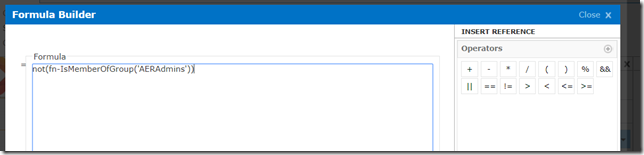
Use this formula

not(fn-IsMemberOfGroup('Your SharePoint Group Name'))

Add your SharePoint group name within brackets. (In my case AERAdmins is the SharePoint group Name)
image

Step 04

Select Disable and Hide from formatting.

Preview

image


Conclusion

You can see the entire form from the below screen shot.

image


You can download the form, you can import and have a look.

https://drive.google.com/file/d/0ByEnOE8DAdvhV1V6WDZOb2w0SFk/view?usp=sharing